Automate your pricing strategy
Set rules, simulate impact, and let ShoppingScraper reprice your products automatically based on competitor data.
20
Rule types
4
Rule categories
Simulation
Test before going live
Auto-reprice
Feed URL generation
Your pricing intelligence, visualized
See match rates, price competitiveness rankings, most competitive products, and top sellers — all in one dashboard that feeds your repricing rules.
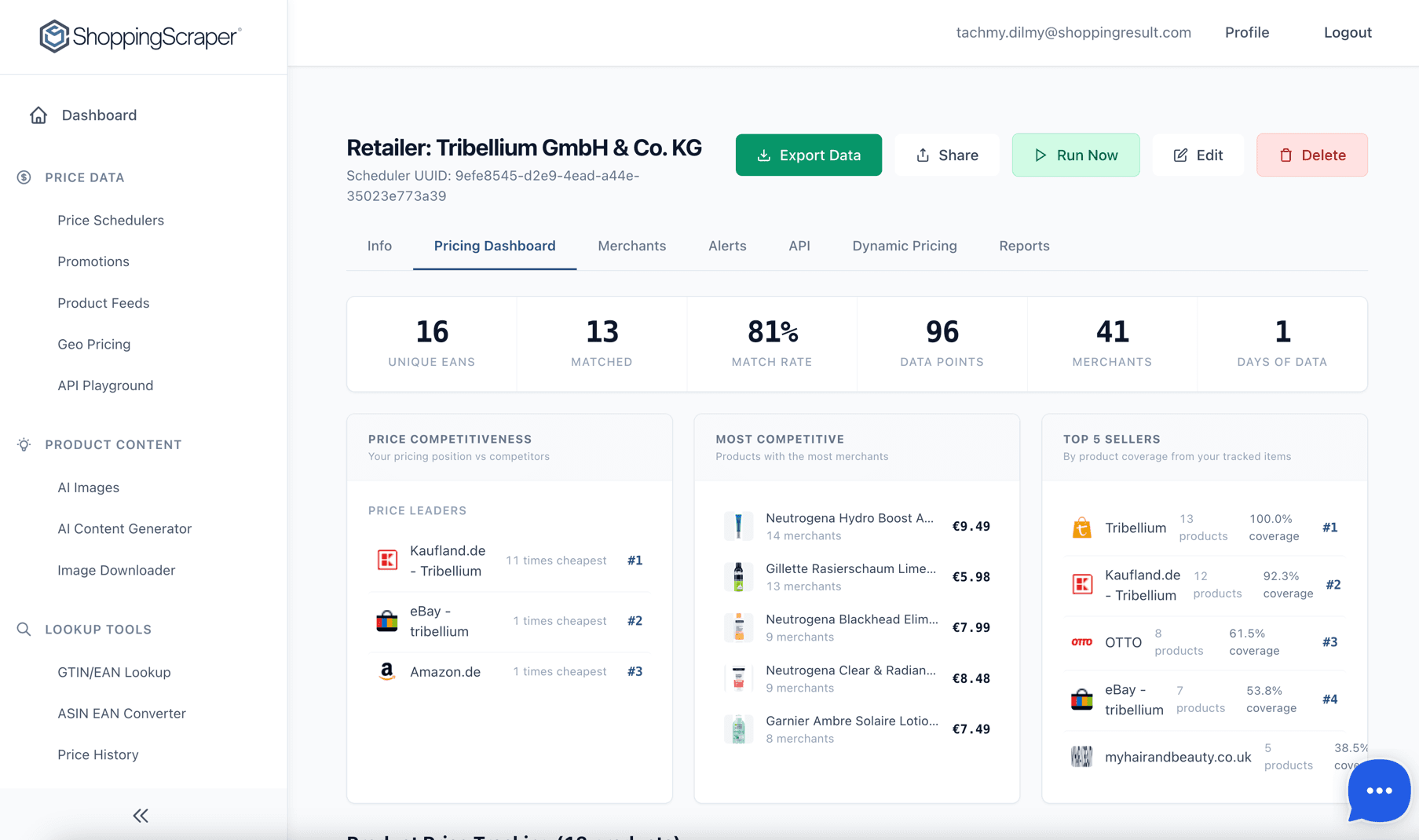
Your pricing command center — match rates, competitiveness, and seller rankings

How automated repricing software works
Choose a strategy
Pick a preset that matches your competitive posture: Aggressive Competitor, Match Market, Premium Brand, or Inventory Optimizer.
Customize rules
Layer Competitor Rules, Safety Rules, Stock/Velocity Rules, and Time-Based Rules to fine-tune exactly how each product is priced.
Activate auto-repricing
Test everything in Simulation Mode first. When satisfied, enable live repricing and generate a feed URL for your shop platform.
Dynamic pricing strategies for ecommerce
Start with a preset and customise every parameter. Each strategy defines a baseline approach that your rules then refine.
Aggressive Competitor
Undercut the cheapest competitor by a fixed percentage. Best for high-volume, commoditised products where winning on price drives conversions.
Match Market
Align your price to the market average or median. Ideal for mid-range positioning where you compete on value rather than being the cheapest.
Premium Brand
Position your price above the market average by a defined margin. Signals quality and protects brand perception for premium products.
Inventory Optimizer
Adjust pricing based on stock levels and sell-through velocity. Raise prices when stock is low, lower them to clear overstock.
Create rules with the visual wizard
The step-by-step wizard guides you through strategy selection, rule configuration, and scope filtering. No code required.
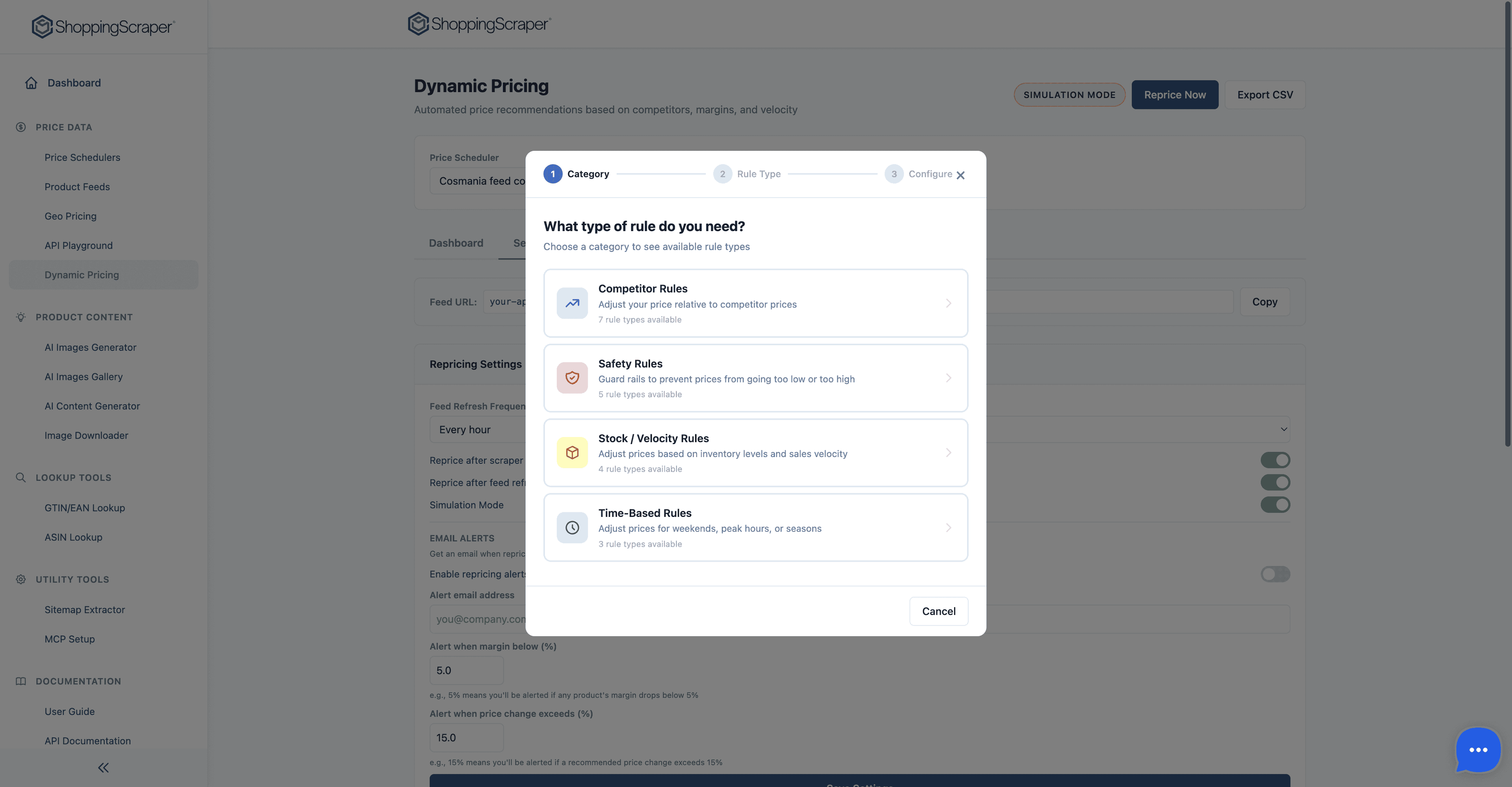
Create pricing rules with the visual wizard
Four categories, complete control
Combine rules from different categories to build a pricing strategy that matches your exact business logic.
Competitor Rules
8 types- Beat lowest competitor by %
- Match lowest competitor price
- Match market average price
- Match specific merchant price
- Stay within % of market average
- Premium positioning above market
- Undercut second-cheapest seller
- Competitor out-of-stock price increase
Safety Rules
5 types- Minimum price floor (absolute)
- Maximum price ceiling (absolute)
- Minimum margin % threshold
- MAP compliance enforcement
- Maximum daily price change %
Stock / Velocity Rules
4 types- Low stock: raise price by %
- High stock: lower price by %
- Out-of-stock: deactivate product
- Overstock clearance: progressive markdown
Time-Based Rules
3 types- Weekend pricing adjustment
- Peak hours premium surcharge
- Seasonal adjustment schedule
Manage all your rules in one place
View, edit, reorder, and toggle rules from the central rules list. Priority ordering ensures rules are evaluated in the right sequence.
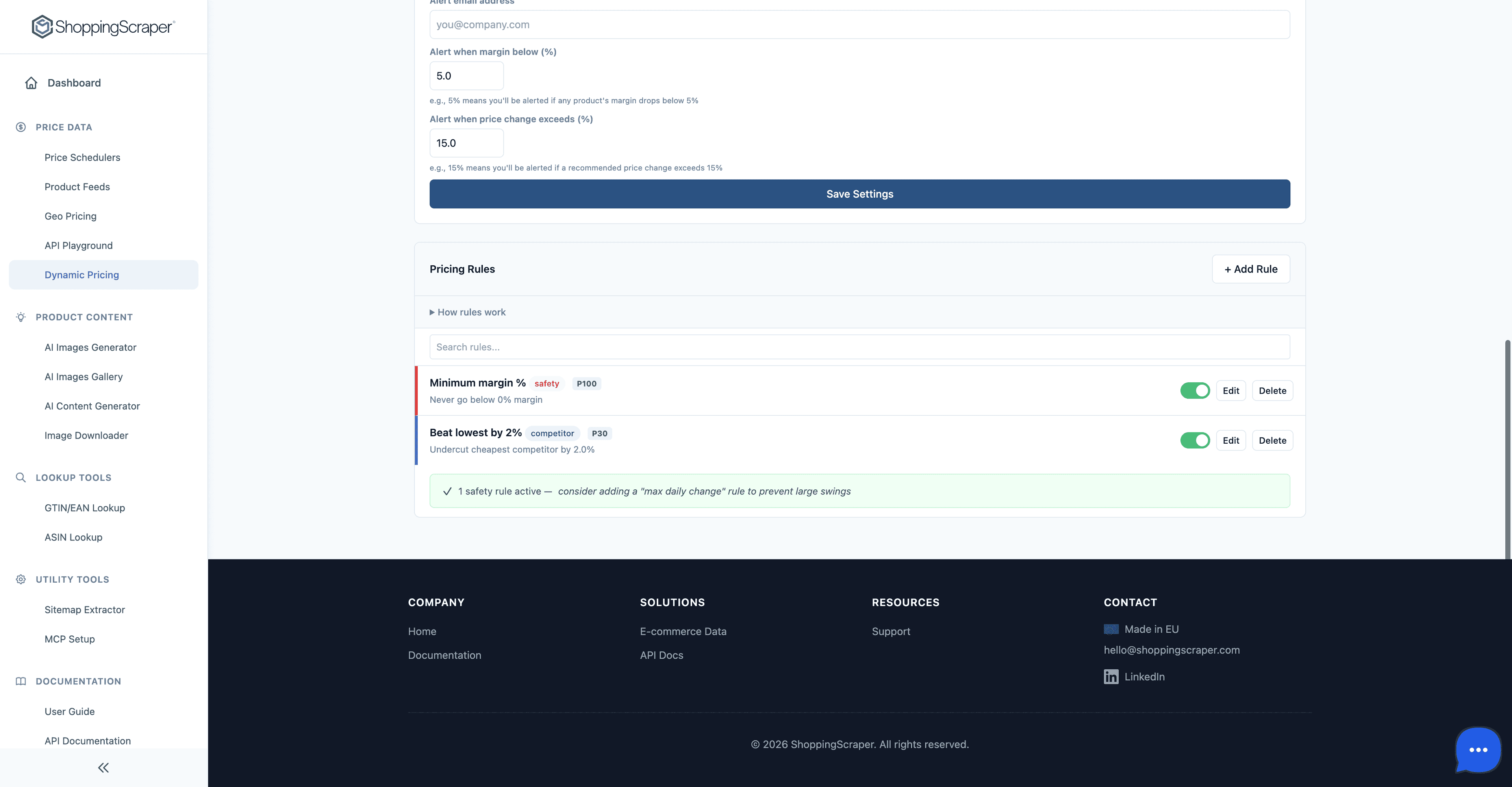
Choose from 20 pricing rule types
Beyond rules: insights and automation
Price Index metric
Every product gets a Price Index score where 100 equals the market average. Instantly see whether you are priced above or below the competition at a glance.
30-day price trend charts
Visualise how your price and the market have moved over the past 30 days. Identify trends, seasonal shifts, and competitor patterns before adjusting rules.
Simulation Mode
Run your pricing rules against live competitor data without changing any actual prices. Review the projected impact on margins and positioning before going live.
Auto-repricing with feed URL
Generate a unique feed URL that your shop platform can poll. Prices are updated automatically based on your active rules, with no manual intervention required.
CSV / JSON export
Export price recommendations in CSV or JSON format for import into your ERP, BI tool, or custom repricing pipeline. Scheduled exports are also available.
Product scope filtering
Apply rules to specific subsets of your catalog by filtering on brand, product tags, price range, or custom attributes. Different strategies for different segments.
Test before you commit
Every pricing strategy can be run in simulation first. Review the projected impact on your catalog before any price changes go live.
See projected prices side by side
Compare your current price, the simulated new price, and the market average for every product in your scope.
Review margin impact
The simulation calculates projected margins based on your cost data, so you know the financial impact before activation.
Check Price Index shifts
See how your Price Index (100 = market average) would change under the new rules. Catch positioning issues early.
Activate with one click
When the simulation results look right, enable live repricing and generate your feed URL in a single action.
Dynamic Pricing API
3 endpoints — copy-paste in cURL, Python, or JavaScript. Full reference at app.shoppingscraper.com/apiguide.
Reprice — trigger immediate rule evaluation
POST /api/dynamic-pricing/reprice runs every active rule against the latest competitor offers. Returns counts: processed, changes, increases, decreases.
Implementation
curl -X GET "https://app.shoppingscraper.com/page?url=https%3A%2F%2Fapp.shoppingscraper.com%2Fapi%2Fdynamic-pricing%2Freprice&raw=true&api_key=your_api_key_here"
https://app.shoppingscraper.com/page?url=https%3A%2F%2Fapp.shoppingscraper.com%2Fapi%2Fdynamic-pricing%2Freprice&raw=true&api_key=your_api_key_here{"url": "https://app.shoppingscraper.com/api/dynamic-pricing/reprice","title": "Trigger immediate repricing","price": "49.99","price_currency": "EUR","availability": "InStock","brand": "Zazu","gtin": "8718924881156","description": "Product description...","images": ["https://..."],"success": true}
Recommendations — suggested prices per SKU
GET /api/dynamic-pricing/recommendations returns suggested prices with full competitor context: which seller triggered the rule, current Buy Box, projected margin.
Implementation
curl -X GET "https://app.shoppingscraper.com/page?url=https%3A%2F%2Fapp.shoppingscraper.com%2Fapi%2Fdynamic-pricing%2Frecommendations&raw=true&api_key=your_api_key_here"
https://app.shoppingscraper.com/page?url=https%3A%2F%2Fapp.shoppingscraper.com%2Fapi%2Fdynamic-pricing%2Frecommendations&raw=true&api_key=your_api_key_here{"url": "https://app.shoppingscraper.com/api/dynamic-pricing/recommendations","title": "Pricing recommendations","price": "49.99","price_currency": "EUR","availability": "InStock","brand": "Zazu","gtin": "8718924881156","description": "Product description...","images": ["https://..."],"success": true}
Feed — stable polling URL for your ERP
GET /api/dynamic-pricing/feed/{task_uuid} is a permanent CSV / JSON feed URL of the latest recommendations. Point your ERP / storefront at it on any cadence.
Implementation
curl -X GET "https://app.shoppingscraper.com/page?url=https%3A%2F%2Fapp.shoppingscraper.com%2Fapi%2Fdynamic-pricing%2Ffeed%2F00000000-0000-0000-0000-000000000000&raw=true&api_key=your_api_key_here"
https://app.shoppingscraper.com/page?url=https%3A%2F%2Fapp.shoppingscraper.com%2Fapi%2Fdynamic-pricing%2Ffeed%2F00000000-0000-0000-0000-000000000000&raw=true&api_key=your_api_key_here{"url": "https://app.shoppingscraper.com/api/dynamic-pricing/feed/00000000-0000-0000-0000-000000000000","title": "Latest recommendations feed (CSV)","price": "49.99","price_currency": "EUR","availability": "InStock","brand": "Zazu","gtin": "8718924881156","description": "Product description...","images": ["https://..."],"success": true}
Dynamic Pricing FAQ
Common questions about the dynamic pricing engine.
Does ShoppingScraper change my shop prices directly?+
Not by default. ShoppingScraper calculates recommended prices and exposes them via a feed URL or export file. Your shop platform polls the feed to apply updates. You remain in full control of when and how prices are changed.
What is Simulation Mode and how does it work?+
Simulation Mode runs all your active pricing rules against live competitor data but does not publish any price changes. You can review the projected new prices, margin impact, and Price Index shifts in the dashboard before activating auto-repricing.
Can I combine multiple rule types on the same product?+
Yes. Rules are evaluated in priority order. For example, you can set a competitor-matching rule as the primary strategy and layer safety rules (price floor, margin minimum, MAP compliance) on top to prevent unprofitable outcomes.
How often are prices recalculated?+
Prices are recalculated each time new competitor data arrives, which depends on your scheduler frequency. With 4x daily monitoring, you get repricing recommendations every 6 hours. The feed URL always serves the latest calculated prices.
What happens if competitor data is missing or stale?+
If no fresh competitor data is available for a product, the engine holds the current price and flags the product for review. Safety rules ensure that stale data never triggers an unintended price change.
Is there a limit to the number of products I can auto-reprice?+
No hard limit. The dynamic pricing engine scales with your plan's API credit allowance. Enterprise plans support catalogs with tens of thousands of SKUs with dedicated processing priority.
What is dynamic pricing in ecommerce?+
Dynamic pricing is an automated strategy where product prices adjust in real-time based on market conditions, competitor pricing, demand, and inventory levels. Instead of manually updating prices, rules-based software like ShoppingScraper monitors competitors and adjusts your prices automatically to maintain competitiveness while protecting margins.
How does automated repricing work?+
Automated repricing works by connecting your product catalog to real-time competitor price data. You define rules (e.g., 'beat the cheapest by 2%' or 'never go below 8% margin'), and the system continuously evaluates competitor prices against your rules. When conditions are met, it generates new recommended prices that can be exported via feed URL to your shop platform.
Start automating your pricing today
100 free API calls. No credit card required. Set up dynamic pricing in under 10 minutes.