Never miss a price change
Set up intelligent alerts for price drops, competitor changes, MAP violations, and buy box losses. Get notified by email the moment it matters.
6 alert types for every pricing scenario
From simple price drop notifications to advanced MAP enforcement. Choose the alert types that match your strategy and combine them for complete coverage.
Price Drop
Get notified when any tracked product's price drops below a threshold you set. Define absolute or percentage-based limits per product, brand, or your entire catalog.
Competitor Price Drop
Alert when a specific competitor lowers their price on products you track. Monitor key rivals and react before they capture market share.
MAP Violation
Detect when resellers price below your Minimum Advertised Price policy. Protect your brand value with automated enforcement monitoring across your distribution network.
I'm Not Cheapest
Instant notification when you lose the cheapest position on a tracked product. Stay competitive by knowing the moment a rival undercuts your price.
Competitor Beats My Price
Alert when any competitor offers a lower price than yours. Includes the competitor name, their new price, and the price difference so you can respond quickly.
Specific Competitor Alert
Monitor a named competitor and get alerts when they change pricing on any product you both sell. Ideal for tracking your closest rival across your full assortment.
How alerts work
Select alert type and scope
Choose from 6 alert types and define the scope: a single product, an entire brand, or all products in a scheduler. Combine multiple alert types for layered coverage.
Configure thresholds and cooldown
Set price thresholds, percentage changes, or competitor conditions. Define a cooldown period (in hours) between re-alerts to avoid inbox overload.
Receive email notifications
When conditions are met, you receive an email with the product name, EAN, old and new price, the triggering merchant, and a direct link to the dashboard.
Set up alerts in minutes
The alert wizard guides you through scope selection, condition configuration, and notification preferences in a few clicks.
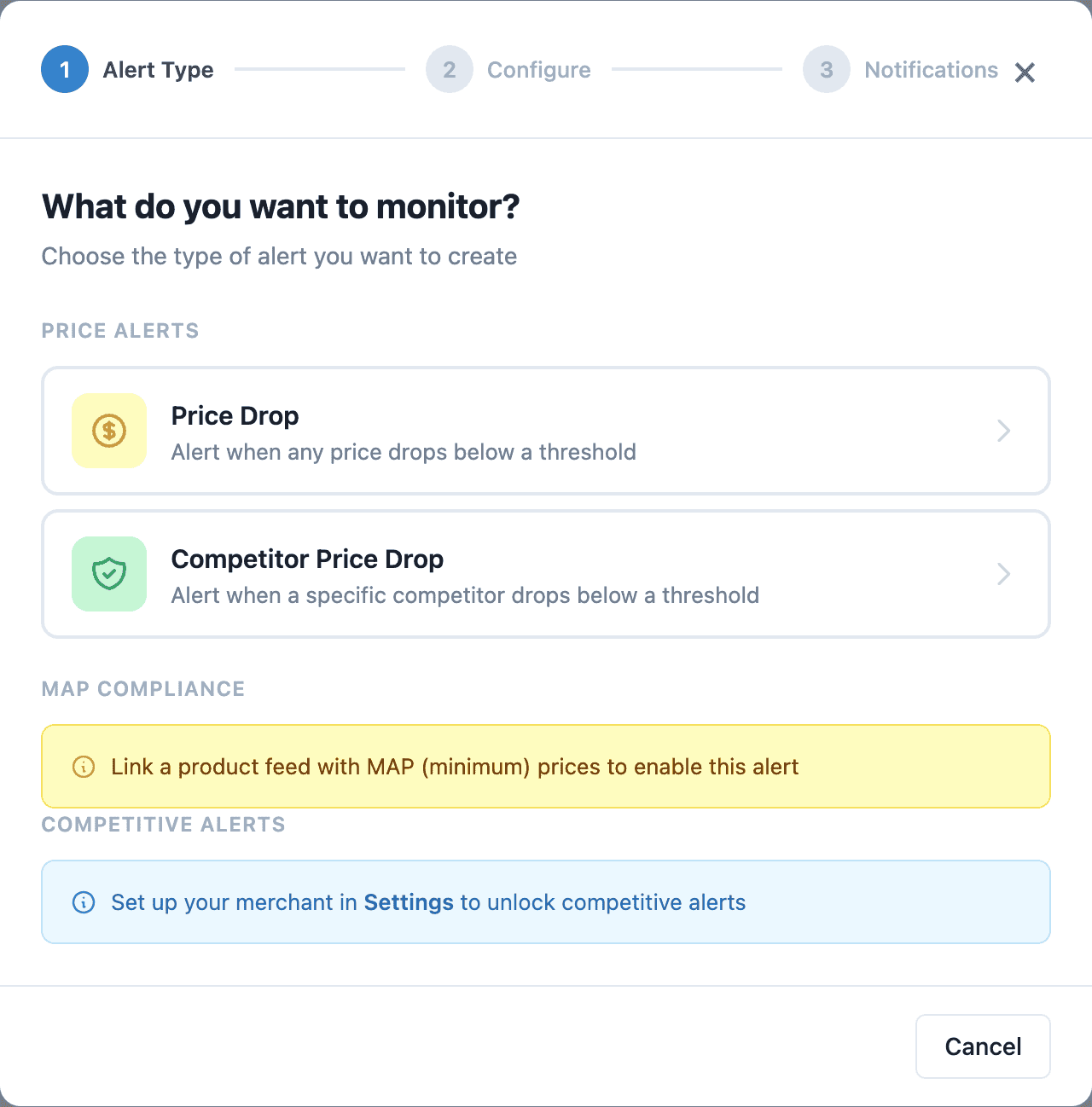
Set up alerts in a few clicks
Fine-tune your conditions
Define price thresholds, percentage changes, cooldown periods, and the exact merchants you want to watch. Every parameter is configurable per alert rule.
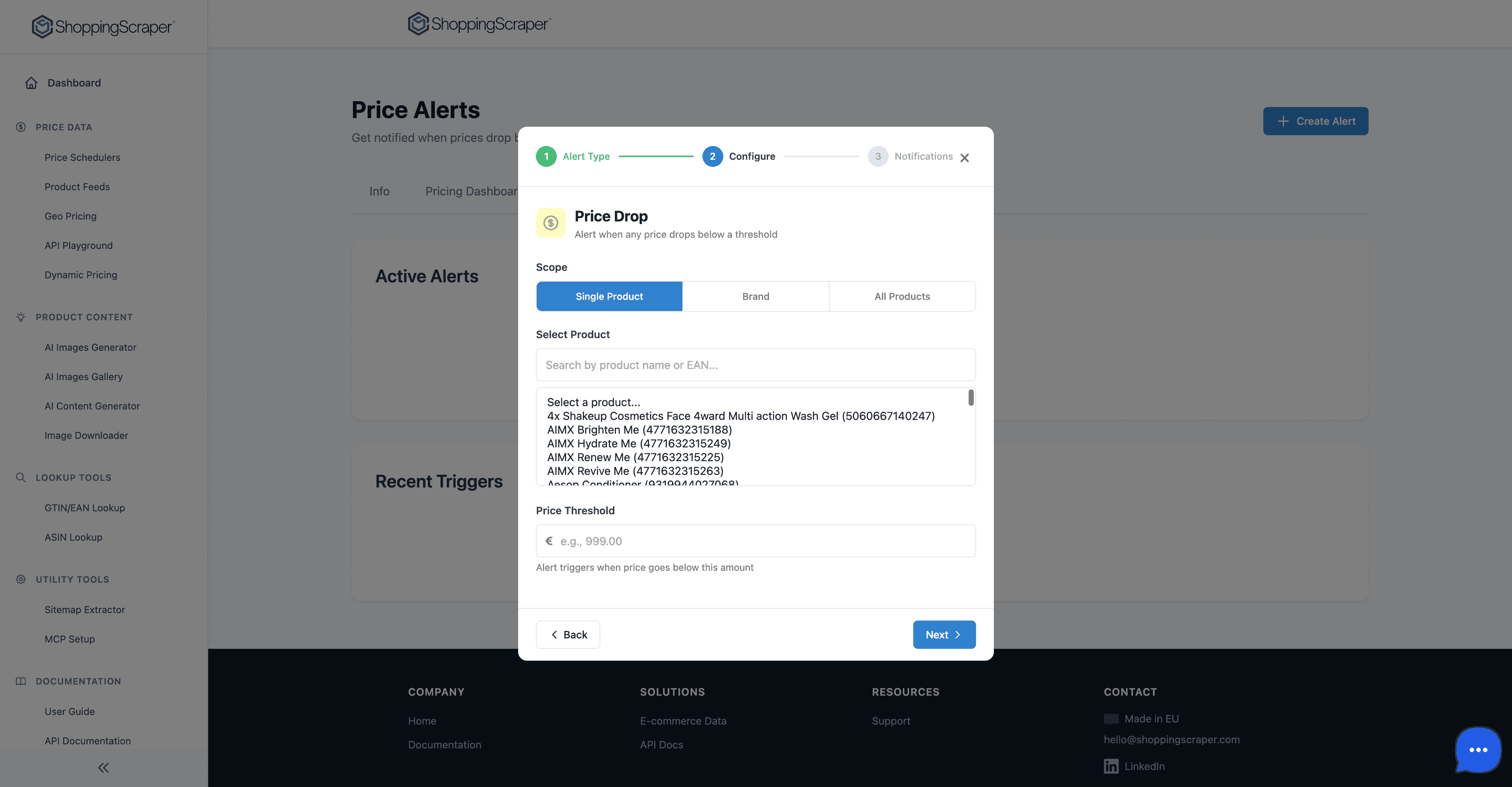
Define your alert conditions
See your price position at a glance
The Price Position Matrix shows exactly where each merchant stands — price leaders in green, competitive in blue, overpriced in red. Know instantly when an alert should fire.
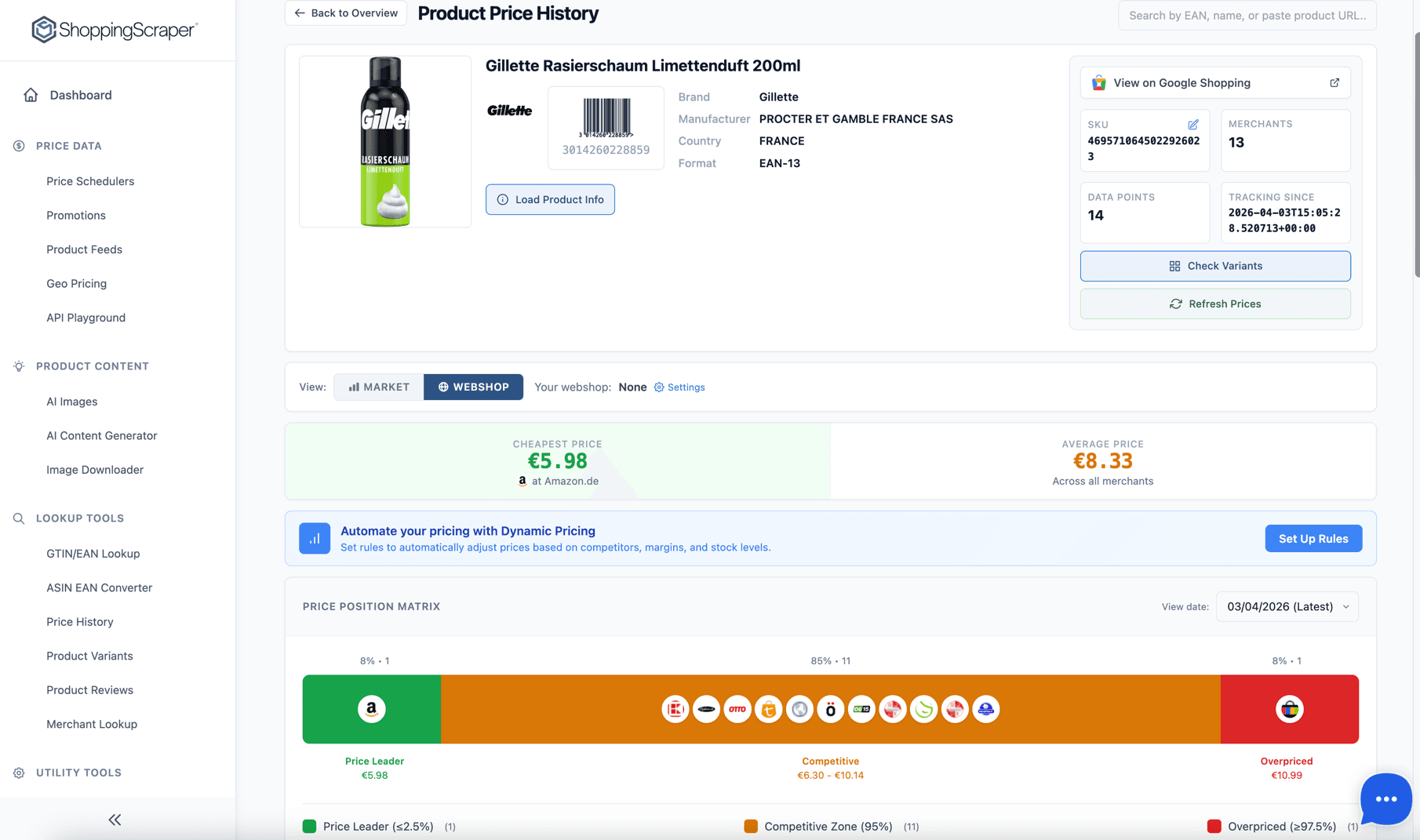
Deep-dive into any product — see exactly where you stand vs competitors
Built for pricing teams, brands, and agencies
For Retailers
Know immediately when competitors undercut you. Set up price drop and competitor alerts across your catalog so you can reprice before losing sales.
For Brands
Detect MAP violations across your distribution network. Monitor authorized and unauthorized resellers with automated alerts that flag policy breaches the moment they occur.
For Agencies
Set up alerts for multiple client accounts. Deliver proactive pricing intelligence by notifying clients the moment their competitive position changes.
Why teams choose ShoppingScraper alerts
Zero extra cost
Alerts are included with your scheduler plan. No additional API credits are consumed when alerts evaluate — they run automatically as part of each scheduler cycle.
Configurable cooldowns
Prevent alert fatigue with per-rule cooldown periods. Choose 1 hour for time-sensitive categories or 24 hours for stable product lines.
Granular scope control
Apply alerts to a single EAN, an entire brand, or all products in a scheduler. Mix and match scopes to build layered alert strategies.
Actionable email notifications
Every alert email includes the product name, EAN, price comparison, merchant details, and a direct link to investigate in your dashboard.
Frequently Asked Questions
How quickly do alerts trigger after a price change?+
Alerts are evaluated after each scheduler run completes. If your scheduler runs daily, you will receive alerts within minutes of that day's run. For higher-frequency alerting, contact us about Enterprise plans with more frequent scheduling.
Can I set different alert types for different products?+
Yes. You can configure alerts at three levels: individual product (by EAN), brand-wide, or across all products in a scheduler. Each alert has its own type, threshold, and cooldown settings, so you can layer multiple alert strategies.
What is the cooldown period?+
The cooldown period is the minimum number of hours between repeated alerts for the same product and condition. For example, a 24-hour cooldown means you receive at most one alert per day per product per alert type, preventing inbox overload during volatile pricing periods.
Which notification channels are supported?+
Currently, all alerts are delivered via email. Each notification includes the product name, EAN, old and new price, the merchant that triggered the alert, and a direct link to the product detail page in your dashboard.
Is there a limit on how many alerts I can create?+
There is no hard limit on the number of alert rules. You can create as many alerts as your pricing strategy requires. Alerts consume no additional API credits — they are evaluated automatically as part of your existing scheduler runs.
What is MAP monitoring and how does it work?+
MAP (Minimum Advertised Price) monitoring detects when resellers price your products below the minimum price you have set for your brand. ShoppingScraper's MAP Violation alert type automatically scans all tracked merchants and notifies you by email when any seller prices below your MAP threshold, helping you enforce pricing policies across your distribution network.
How do I set up price drop alerts for my products?+
Setting up price drop alerts takes under 2 minutes. Navigate to any scheduler, click the Alerts tab, then Create Alert. Choose 'Price Drop' as the alert type, define your scope (single product, brand, or all products), set the price threshold, and configure the cooldown period. You will receive email notifications whenever the condition is met.
Start getting price alerts today
100 free API calls. No credit card required. Set up your first alert in minutes.