How to optimize API calls for faster scraping
From request throttling and async programming to caching, proxy rotation, and cloud scaling, this comprehensive guide covers every technique for maximizing API scraping throughput and reliability.
When you're scraping data from APIs, speed is everything. Slow API calls can waste time and resources, especially when scaling from 1,000 to 10,000+ requests. Here's how to make your scraping faster and more efficient:
- Throttling and Backoff: Control request rates to avoid overwhelming servers and implement exponential backoff for handling failures.
- Random Delays: Add slight variations between requests to mimic human behavior and avoid detection.
- Asynchronous Requests: Use libraries like
aiohttpto process multiple API calls at once, improving speed dramatically. - Multiprocessing: For CPU-heavy tasks like data parsing, leverage Python's multiprocessing tools to distribute the workload.
- Caching: Store frequently used data in tools like Redis to reduce redundant API calls and latency.
- Session Reuse: Use persistent sessions (
requests.Session()) to eliminate unnecessary connection overhead. - Proxy Management: Rotate proxies and manage headers dynamically to avoid blocks and access region-specific data.
- Structured Data Endpoints: Use APIs that deliver data in JSON or CSV formats to save time on parsing.
- Cloud Scaling: Deploy scrapers on platforms like AWS or Google Cloud to handle large-scale operations seamlessly.
Use Request Throttling and Exponential Backoff
Request throttling helps regulate the number of API calls, ensuring servers aren't overwhelmed, while exponential backoff increases wait times after failures, allowing servers to recover. For example, Cisco's PSIRT OpenVuln API restricts calls to 5 per second and 30 per minute. Throttling ensures these limits aren't exceeded, and backoff minimizes the chances of compounding HTTP 429 errors.
"Throttling limits the number of requests, protecting the server from getting overwhelmed by high traffic. It's like setting a speed limit so no one can flood the application with too many calls simultaneously", explains Data Journal.
Add Randomized Delays Between Requests
While throttling is essential, adding random delays between requests can make automated traffic appear less predictable. Instead of fixed intervals, introduce small, random variations (a technique often called jitter). For instance, the following Python code snippet demonstrates how to add a delay of 0.5 to 1.5 seconds between requests:
import time
import random

for url in url_list:
    response = requests.get(url)
    # Random delay between 0.5 and 1.5 seconds
    time.sleep(random.uniform(0.5, 1.5))
These randomized delays mimic human-like behavior, helping to avoid triggering server defenses or creating noticeable patterns in traffic.
Configure Exponential Backoff for Failed Requests
Exponential backoff works by gradually increasing the delay between retries after each failure. For instance, the delay might start at 2 seconds, then increase to 4 seconds, then 8 seconds, and so on. This approach gives servers more time to recover from high demand or temporary issues.
Python's urllib3 library simplifies implementing exponential backoff. Here's an example:
from urllib3.util.retry import Retry
from requests.adapters import HTTPAdapter
import requests

retry_strategy = Retry(
    total=5,                    # Maximum of 5 retry attempts
    backoff_factor=1,           # Base multiplier of 1 second
    status_forcelist=[429, 500, 502, 503, 504],
    backoff_jitter=0.3          # Add random jitter up to 0.3 seconds
)

adapter = HTTPAdapter(max_retries=retry_strategy)
session = requests.Session()
session.mount("https://", adapter)
It's also crucial to check for Retry-After headers in API responses, as these specify how long to wait before retrying. Always set a maximum retry limit to avoid endless loops. Apply backoff only for temporary errors like 429, 500, or 503. Avoid retrying client-side errors such as 400 (Bad Request) or 401 (Unauthorized), as these typically require fixing the request itself rather than waiting.
"By exponentially increasing the wait time between retries, it gives the server progressively more time to recover from the current load", notes Antonello Zanini from The Web Scraping Club.
Apply Asynchronous and Multiprocessing Methods
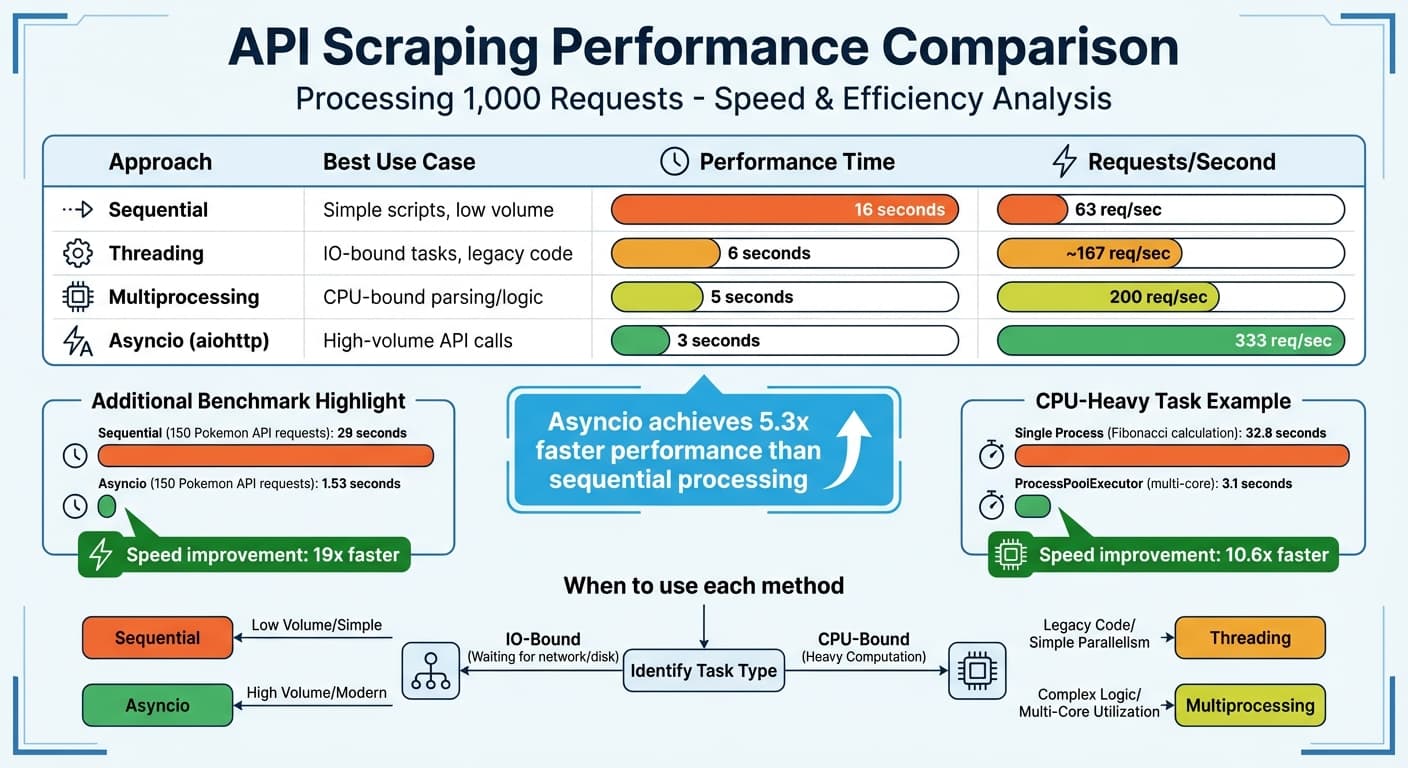
API Scraping Performance Comparison: Sequential vs Asynchronous Methods
When scraping large datasets via APIs, sequential requests can slow things down significantly. Asynchronous programming and multiprocessing tackle this issue by processing multiple requests at once, boosting speed and efficiency. For example, benchmarks reveal that sequential processing achieves 63 requests per second, while asynchronous methods like asyncio handle 333 requests per second. Both approaches work well with techniques like throttling and caching to reduce delays.
The choice between these methods depends on the nature of your task. Asynchronous programming is ideal for IO-bound tasks, such as waiting for API responses, while multiprocessing is better suited for CPU-bound tasks, like parsing complex JSON or performing data transformations. Bernardas Ališauskas from Scrapfly sums it up perfectly: "Multi processing for CPU performance and asyncio for IO performance".
"Asynchronous routines are able to 'pause' while waiting on their ultimate result to let other routines run in the meantime." - Sam Agnew, Twilio
Let’s dive into how Python’s aiohttp can help you manage concurrent API requests efficiently.
Send Concurrent Requests with Python's aiohttp
Python’s aiohttp library makes handling multiple API calls a breeze. Instead of waiting for each request to finish, it processes them concurrently, saving time. For instance, 150 requests to the Pokemon API took 29 seconds synchronously but only 1.53 seconds using aiohttp.
Using async and await, you can create coroutines to fetch data from multiple URLs simultaneously. Here’s an example:
import aiohttp
import asyncio

async def fetch_data(session, url):
    async with session.get(url) as response:
        return await response.json()

async def main():
    urls = [
        "https://api.example.com/products/1",
        "https://api.example.com/products/2",
        "https://api.example.com/products/3"
    ]

    async with aiohttp.ClientSession() as session:
        tasks = [fetch_data(session, url) for url in urls]
        results = await asyncio.gather(*tasks)
        return results

# Run the async function
data = asyncio.run(main())
One key tip: always use a single session per application rather than per request. The aiohttp documentation highlights this as a best practice: "Don't create a session per request. Most likely you need a session per application which performs all requests together". This approach enables connection pooling and reuses keep-alive connections, enhancing performance.
To avoid overwhelming servers, you can limit concurrency using asyncio.Semaphore. Here’s how:
async def fetch_with_limit(session, url, semaphore):
    async with semaphore:
        async with session.get(url) as response:
            return await response.json()

async def main():
    semaphore = asyncio.Semaphore(10)  # Max 10 concurrent requests
    async with aiohttp.ClientSession() as session:
        tasks = [fetch_with_limit(session, url, semaphore) for url in urls]
        results = await asyncio.gather(*tasks)
Parallelize API Calls with Multiprocessing
When the workload shifts from waiting for responses to processing data, multiprocessing comes into play. It bypasses Python's Global Interpreter Lock (GIL) by running separate processes, each with its own memory and interpreter. On a 12-core machine, this can result in up to a 12x speed improvement for CPU-heavy tasks.
Here’s how to use Python’s concurrent.futures.ProcessPoolExecutor for parallel processing:
from concurrent.futures import ProcessPoolExecutor
import os

def parse_product_data(json_data):
    # CPU-intensive parsing logic
    processed = {
        'title': json_data.get('title', '').upper(),
        'price': float(json_data.get('price', 0)) * 1.1,
        'keywords': extract_keywords(json_data.get('description', ''))
    }
    return processed

def main():
    # Assume api_responses contains fetched JSON data
    with ProcessPoolExecutor(max_workers=os.cpu_count()) as executor:
        results = list(executor.map(parse_product_data, api_responses))
    return results
For optimal performance, combine asyncio for fetching data with multiprocessing for parsing. This approach balances IO and CPU-bound tasks effectively. In one test, a CPU-heavy Fibonacci calculation dropped from 32.8 seconds in a single process to just 3.1 seconds using ProcessPoolExecutor on a multi-core machine.
| Approach | Best Use Case | Performance (1,000 requests) |
|---|---|---|
| Sequential | Simple scripts, low volume | 16 seconds |
| Threading | IO-bound tasks, legacy code | 6 seconds |
| Multiprocessing | CPU-bound parsing/logic | 5 seconds |
| Asyncio (aiohttp) | High-volume API calls | 3 seconds |
To avoid unnecessary overhead, set the number of processes to match your CPU core count using os.cpu_count(). This ensures a balance between efficiency and resource management.
Use Caching and Session Management
In addition to parallel processing, caching and persistent sessions are essential for reducing latency. Caching works by storing frequently requested data in fast, RAM-based storage, which eliminates the need to repeatedly make time-consuming API calls. Studies show that 70–85% of queries are often identical or very similar, and caching can slash API response times from 200–500ms to under 10ms. For instance, retrieving data from a Redis cache typically takes less than 50ms, which is far quicker than querying a database.
Cache API Responses with Redis
Redis is a great choice for caching in distributed scraping systems, thanks to its microsecond latency and support for complex data structures. A common approach is the cache-aside pattern: your scraper checks Redis first, and only fetches from the API if the data isn't already cached.
Here’s an example using Python’s redis library:
import redis
import requests
import hashlib
import json

# Connect to Redis
cache = redis.Redis(host='localhost', port=6379, decode_responses=True)

def get_cached_response(url, ttl=600):
    # Create a unique cache key
    cache_key = hashlib.md5(url.encode()).hexdigest()

    # Check if the response is already cached
    cached = cache.get(cache_key)
    if cached:
        return json.loads(cached)

    # Fetch data from the API if not cached
    response = requests.get(url)
    data = response.json()

    # Store the response in cache with a 10-minute TTL
    cache.setex(cache_key, ttl, json.dumps(data))
    return data

# Example usage
product_data = get_cached_response("https://api.example.com/products/12345")
The Time-To-Live (TTL) value should depend on how often the data changes. For example, semi-dynamic data like pricing might need a TTL of 10 minutes, while static information like product descriptions can stay cached for hours. If you're using Python, the requests-cache library offers a simple way to add caching with minimal code changes.
A key tip: use unique hashes based on URL parameters and headers to "fingerprint" requests. This ensures the cache can differentiate between similar but distinct queries. Be cautious with sensitive data like authentication tokens - redact them from cache keys to prevent storing private information.
Reuse Sessions for Persistent Connections
While caching reduces redundant API calls, reusing sessions can cut overhead even further by keeping connections alive. Python’s requests.Session() avoids repeated TCP and TLS handshakes, which can significantly speed up multiple requests. For example, Matthew Davis noted that session reuse tripled the speed of data downloads in his scraping projects.
Sessions also simplify handling cookies, which is crucial for maintaining login states across multiple pages. By configuring headers, authentication tokens, and proxy settings at the session level, you can ensure they apply to all subsequent requests:
import requests
from requests.adapters import HTTPAdapter
from urllib3.util.retry import Retry

# Create a session
session = requests.Session()

# Set up a retry strategy
retry_strategy = Retry(
    total=3,
    backoff_factor=0.5,
    status_forcelist=[502, 503, 504]
)

# Mount the session with connection pool settings
adapter = HTTPAdapter(
    pool_connections=10,
    pool_maxsize=20,
    max_retries=retry_strategy
)
session.mount("https://", adapter)

# Set global headers
session.headers.update({
    'User-Agent': 'Mozilla/5.0',
    'Accept': 'application/json'
})

# Reuse the session for multiple requests
response1 = session.get("https://api.example.com/products/1")
response2 = session.get("https://api.example.com/products/2")
For high-concurrency scraping, adjust pool_connections (number of connection pools) and pool_maxsize (maximum connections per pool). If you're sending 20 concurrent requests, set pool_maxsize to at least 20. Always use context managers (with requests.Session() as session:) to ensure proper cleanup of resources.
Manage Proxies, Headers, and Concurrency Limits
Effectively managing proxies, headers, and concurrency is essential for maintaining speed and avoiding blocks during scraping. Rotating proxies help distribute requests across various IP addresses, reducing the risk of hitting rate limits. Dynamic header management makes your scraper appear as regular user traffic, while concurrency limits ensure you stay within API quotas. For instance, Google's Content API for Shopping often caps users at around 1,000 requests daily, with a queries-per-second (QPS) limit of about 5 QPS. Exceeding these thresholds can lead to HTTP 429 "Too Many Requests" errors, temporarily restricting your account. These practices, alongside caching and persistent sessions, help reduce latency and avoid detection.
Rotate Proxies to Avoid Detection
Rotating proxies spreads requests across multiple IP addresses, making it harder for anti-bot systems to flag your activity. Residential proxies, assigned by ISPs to real devices, are more reliable and trusted compared to datacenter IPs, which are faster and more budget-friendly but easier to detect.
A practical tip: aim for a 90–95% success rate instead of striving for perfection. Achieving near-perfect rates often requires costly proxy setups for every request. Advanced proxy APIs charge between 1 and 50 credits per request, depending on whether features like JavaScript rendering or premium residential IPs are needed.
Proxies are also essential for geotargeting. They allow you to access region-specific content by using IPs tied to particular countries or cities. This is especially useful for scraping localized pricing or availability data. Some advanced APIs even support parameters like country_code and tld (e.g., google.it for Italy) to fetch region-specific data.
Automate Header Updates with ShoppingScraper

While proxies manage IPs, headers ensure your requests mimic genuine user traffic. Rotating headers manually - like User-Agents or Cookies - can be tedious and prone to errors. ShoppingScraper simplifies this with an advanced header management system designed to boost success rates on challenging sites. It uses a pool of over 40 million proxies, achieving an average success rate of about 98%.
The device_type=mobile parameter automatically selects mobile User-Agents. If you need to send custom headers, such as specific Cookies or Referers, you can use the keep_headers=true parameter. However, this disables the automated system and may reduce success rates.
"When you send your own custom headers you override our header system, which oftentimes lowers your success rates."
ShoppingScraper delivers high-reliability access to public product data across a wide range of retailers. The service manages the underlying request infrastructure for you, so requests that target publicly available pages return structured data without requiring you to maintain that layer yourself. Average request latencies range from 4 to 12 seconds depending on the target, and failed requests (usually 1–3% of total volume) are not charged.
Set Concurrency Limits to Match API Restrictions
Concurrency refers to how many API requests you process simultaneously. If your plan allows 5 concurrent requests and you send a 6th while the others are still active, you'll hit a "429 Too Many Requests" error. Throughput depends on both concurrency and request duration. For example, with 5 concurrent slots and 1-second request durations, you can process up to 300 requests per minute. If durations increase to 10 seconds, throughput drops to around 30 requests per minute.
To optimize concurrency, use this formula:
ceil(Rate Limit per Minute / 60 * Average Response Time in Seconds).
This ensures every API call is optimized for real-time performance. High-quality scraping APIs often provide headers like Concurrency-Limit (total allowed) and Concurrency-Remaining (available slots) to help you dynamically adjust request patterns. Always check the Concurrency-Remaining header before sending new batches to avoid 429 errors.
If your scraper isn’t reaching its concurrency limit, local issues could be the cause - for example, firewall restrictions or OS-level limits. On Linux, you can modify /etc/security/limits.conf to prevent 'ulimit' from restricting simultaneous connections. Keep in mind, when a request is canceled, it might take up to 3 minutes for that concurrency slot to become available again.
These tactics work together to refine API calls, ensuring faster and more reliable real-time scraping.
Use Structured Data Endpoints and Geotargeting
Structured data endpoints simplify data extraction by converting HTML into JSON or CSV, eliminating the need for manual parsing with regex or DOM traversal. This approach delivers ready-to-use data, reducing processing time and enabling seamless integration into databases or analytics tools. For instance, many modern e-commerce platforms load seller data via AJAX. With structured endpoints, you can automatically retrieve a unified JSON containing product, seller, and offer details.
Export Data with JSON/CSV Endpoints
The OUTPUT_FORMAT parameter lets you export data in either JSON or CSV formats. JSON is ideal for handling complex, nested data like e-commerce product relationships, while CSV works best for spreadsheets or relational databases. By default, JSON is used, but CSV is a practical choice for importing data directly into tools like Excel or Google Sheets.
For improved efficiency, batch multiple queries into a single Async API POST request. You can also set up a callback object with a webhook URL to receive data automatically when processing is complete, eliminating the need to poll the API for updates. To further optimize performance, use the Accept-Encoding: gzip header to compress large API responses.
Set Geotargeting Parameters for Regional Data
Geotargeting is essential for accurate regional data, especially since platforms often display content tailored by IP location. The country_code parameter allows you to route traffic through proxies in specific countries using two-letter ISO codes like us, de, or jp. For example, when scraping Google Shopping, ensure the country_code matches the tld (Top Level Domain) - use tld=de and country_code=de for Germany.
| Parameter | Function | Example |
|---|---|---|
| country_code | Routes traffic through specific country proxies | us, gb, au |
| tld | Sets the specific Google domain to scrape | com, co.uk, de |
| UULE | Targets a specific region or city | "Paris, France" |
| HL | Host Language for search results | de for German results |
| GL | Boosts matches from a specific country | Refines regional relevance |
For hyper-local data, the UULE parameter lets you zero in on specific cities, like Paris, France, instead of targeting an entire country. Pair this with the HL (Host Language) parameter to ensure search results are returned in the appropriate local language. These geotargeting strategies, combined with structured endpoints, make real-time scraping more efficient by delivering precise, ready-to-use data tailored to regional needs.
Scale with Distributed Systems and Cloud Infrastructure
Once you've optimized API call latency, the next challenge is scaling your infrastructure to efficiently manage massive volumes. While fine-tuning individual API calls is essential, scaling your backend with cloud infrastructure ensures those optimizations hold up under heavy loads. A single-server setup simply can't handle the demands of scraping thousands - or even millions - of product listings daily. Distributed systems and cloud platforms step in here, automatically adjusting resources to manage workloads ranging from a few requests to thousands of simultaneous operations. This serverless approach allows your team to focus on data extraction instead of infrastructure headaches.
Deploy Scrapers on Cloud Platforms
Cloud platforms like AWS Lambda, Google Cloud Functions, and Azure Functions are perfect for scaling scrapers. These services use event-driven architectures to automatically allocate resources, so you're only paying for what you use. Tasks can be triggered by schedules, webhooks, or queue-based operations, ensuring optimal resource usage while avoiding costs from idle servers. Plus, benchmarks show that parallel processing can significantly speed up operations.
Another way to improve efficiency is by deploying scrapers close to your target website's servers. For instance, hosting scrapers in the same geographic region as the website can shave off 30–100 ms per network hop. If you're targeting European e-commerce platforms, deploying your cloud functions in EU-based data centers instead of US ones can make a noticeable difference.
"Speed is the heartbeat of reliable web scraping. Faster scrapers finish jobs before windows close, cost less to run, and leave more room for retries." - Technochops
For large-scale scraping, it’s wise to implement dead letter queues to track and analyze failures. Additionally, use cloud-native secret management tools to securely store API keys rather than embedding them in your code. If you're using headless browsers in the cloud, blocking non-essential resources like images, fonts, and ads can save both bandwidth and CPU power. These strategies work hand-in-hand with earlier optimization methods to ensure smooth scaling as your operations expand.
Compare ShoppingScraper Plans for Different Scales
ShoppingScraper offers plans tailored to meet various volume and concurrency needs, making it easier to adopt a distributed, scalable approach. Here's a breakdown of their Advanced and Enterprise plans:
| Feature | Advanced (€399/mo) | Enterprise (€999+/mo) |
|---|---|---|
| API Requests | 150,000 | 500,000+ |
| Team Users | 5 users | Unlimited |
| Marketplaces | 3 marketplaces | 5 marketplaces |
| Additional Requests | €29 per 10k | €15 per 10k |
| Infrastructure | Standard API access | Custom concurrency optimization |
| Support | Standard | Dedicated expert consultation |
The Advanced plan, priced at €399/month, is ideal for businesses that need up to 150,000 API requests and access to three marketplaces. It’s a great fit for monitoring competitor pricing on platforms like Google Shopping or Amazon. If you exceed your limit, additional requests are billed at €29 per 10,000.
The Enterprise plan, starting at €999+/month, is designed for high-volume operations. It supports 500,000+ API requests, offers custom concurrency limits, and includes dedicated expert support for scaling challenges. Additional requests are more cost-effective at €15 per 10,000. For businesses managing billions of pages, the Enterprise plan removes fixed caps entirely, allowing you to configure thread limits and performance settings to suit your workload.
Conclusion
Improving the speed of API calls for web scraping boils down to combining a few key techniques. Using asynchronous processing and concurrent threads can boost performance by 2x–10x compared to sequential methods. Connection pooling adds another 1.2x–2x improvement. On top of that, reducing payload sizes with gzip compression helps save bandwidth and speeds up processing.
While these methods can lead to impressive performance gains, implementing them manually demands significant expertise and effort. That’s where ShoppingScraper comes in. The platform simplifies the entire process by handling tasks like proxy management, automated content rendering, and header automation at the API level. This allows your team to focus on extracting and analyzing the data that matters most.
ShoppingScraper also eliminates the hassle of custom HTML parsing. Its structured data endpoints provide pre-formatted JSON or CSV files directly from sources like Google Shopping. Collecting data from different regions is easy too — just use the country_code and tld parameters to retrieve localized public product data without maintaining your own global infrastructure. For large-scale operations, the platform supports asynchronous requests with webhook callbacks, making it possible to handle thousands of queries without maintaining persistent connections. By automating these optimizations, ShoppingScraper lets you focus on turning data into actionable insights.
To meet diverse needs, ShoppingScraper offers flexible pricing plans. The Advanced plan provides 150,000 API requests for €399/month, while the Enterprise plan starts at €999+/month. This tiered approach allows you to start small and scale up as your data scraping requirements grow.
FAQs
How do I pick the right concurrency level without triggering 429s?
To steer clear of 429 Too Many Requests errors, begin with a low concurrency level when making requests and slowly ramp it up while keeping an eye on server responses. Always adhere to the rate limits outlined in the API documentation or provided in response headers.
You can also implement strategies like introducing delays between requests, using exponential backoff to handle retries, and rotating IP addresses to distribute the load. Pay attention to the Retry-After headers, as they provide guidance on when to resume requests, allowing you to adjust dynamically and scrape efficiently without crossing the server's limits.
When should I use asyncio vs multiprocessing for API scraping?
asyncio works best for I/O-bound tasks, such as managing numerous API calls at the same time. It speeds things up by handling multiple requests within one thread, making it ideal when the main delay comes from waiting for API responses.
On the other hand, for CPU-bound tasks like intensive data processing, multiprocessing is the way to go. It takes advantage of multiple CPU cores, enabling true parallel execution and offering better performance for computation-heavy operations.
What should I include in a cache key to avoid incorrect cached data?
To avoid caching incorrect or outdated data, make sure your cache key includes all variables that uniquely identify the response. These typically involve request parameters like query strings, headers, or body content. For added precision, consider incorporating headers such as authorization tokens or timestamps. This approach ensures that every unique request corresponds to a specific cache entry, minimizing the chance of delivering outdated information.
Related Blog Posts
CTO & Co-founder
Full-stack engineer specializing in web scraping, API design, and AI applications for e-commerce. Built ShoppingScraper's infrastructure processing 1M+ daily product lookups.